ESC Telemetry
Most helicopter ESCs can report what they're doing: RPM, voltage, current, mAh used, temperatures, and more. Connect the ESC's telemetry wire to the flight controller and Rotorflight can use these readings for the battery meter and SmartFuel, log them to Blackbox, and pass them on to your radio.
ESC telemetry is not an RPM source for the governor
Serial ESC telemetry updates too slowly for the governor or the RPM filter. Use the ESC's RPM output or an RPM sensor, or bidirectional DShot -- see RPM Measurement.
Supported ESCs
| Telemetry Protocol | ESCs |
|---|---|
| BLHELI32 | BLHeli_32 and KISS ESCs |
| HOBBYWINGV4 | Hobbywing Platinum Pro V4 / V4.1, FlyFun V5 |
| HOBBYWINGV5 | Hobbywing Platinum V5 |
| SCORPION | Scorpion (unsolicited telemetry) |
| KONTRONIK | Kontronik Kosmik and Kolibri |
| OMPHOBBY | OMPHobby |
| ZTW | ZTW Skyhawk |
| APD | APD HV Pro (UART telemetry) |
| OPENYGE | YGE (firmware V1.03547 or later) |
| FLYROTOR | FlyRotor |
| GRAUPNER | Graupner |
| XDFLY | XDFly |
| FBUS | FrSky ESCs and sensors on F.Bus |
| SRXL2 | Spektrum SRXL2 ESCs (new in 2.4) |
| CASTLE (motor protocol) | Castle Creations, Live Link -- see below |
Setting it up
-
Wire it. Connect the ESC's telemetry output to a free UART RX pad on the flight controller, plus ground. Never connect the telemetry lead's + pin -- on some ESCs it carries the BEC voltage, which would damage the flight controller.
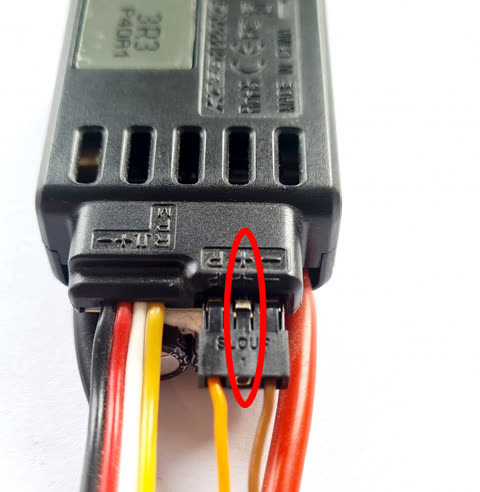
If you want forward programming as well, the wire needs to be two-way: see that page for using the TX pad, or RX with pin swap.
-
Choose the port. On the Configuration tab, set that UART to ESC Telemetry. Save and reboot.
- Choose the protocol. On the Motors tab, set Telemetry Protocol to your ESC. Save.
- Power up together. Many ESCs only start sending telemetry after a handshake at power-up. Power the flight controller and ESC at the same time, from the flight battery -- not USB first, then the battery.
- Check. The Motors tab shows RPM, voltage, current and temperature from the ESC.
Using it for the battery meter
On the Power tab, set Battery Voltage Source and/or Battery Current Source to ESC. The ESC is then your battery meter -- useful when the flight controller has no current sensor of its own.
Correcting the readings
Some ESCs' voltage and current readings are a few percent out. On the Motors tab, Sensor Correction scales the Voltage, Current and Consumption readings. Compare against a good meter (or the charger's "mAh put back in") and adjust.
Castle Creations
Castle ESCs send telemetry back on the throttle wire itself ("Live Link"), so no extra UART is needed.
- Enable Link Live on the ESC with the Castle Link software.
-
Add a pull-up resistor between the signal wire and the BEC + wire, on the lead between the ESC and the flight controller:
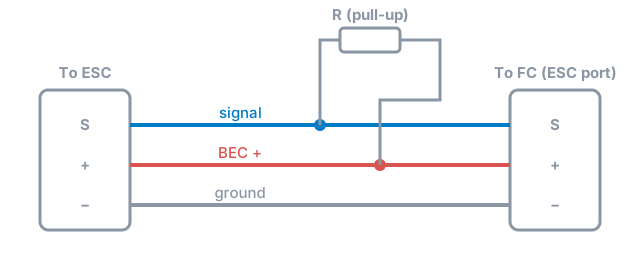
The ESC has a 6.65 kΩ pull-down inside, so the resistor sets the signal voltage. 8.2 kΩ works with BEC voltages of 5-11 V on a 5 V-tolerant pin, and up to 7.4 V on a 3.3 V-only pin. Common choices by BEC voltage:
BEC Resistor 5 V 5 kΩ 7.4 V 8.2 kΩ 9.6 V 13 kΩ 12 V 18 kΩ -
On the Motors tab, set Throttle Protocol to CASTLE, and leave the Telemetry Protocol off. Castle mode limits the throttle update rate to 100 Hz.
Some Castle ESCs don't report current.