Configuration
Board-level settings: names, statistics, loop speed, sensors, features, serial port functions and board orientation. Most of these need a reboot, so the tab saves with Save and Reboot.
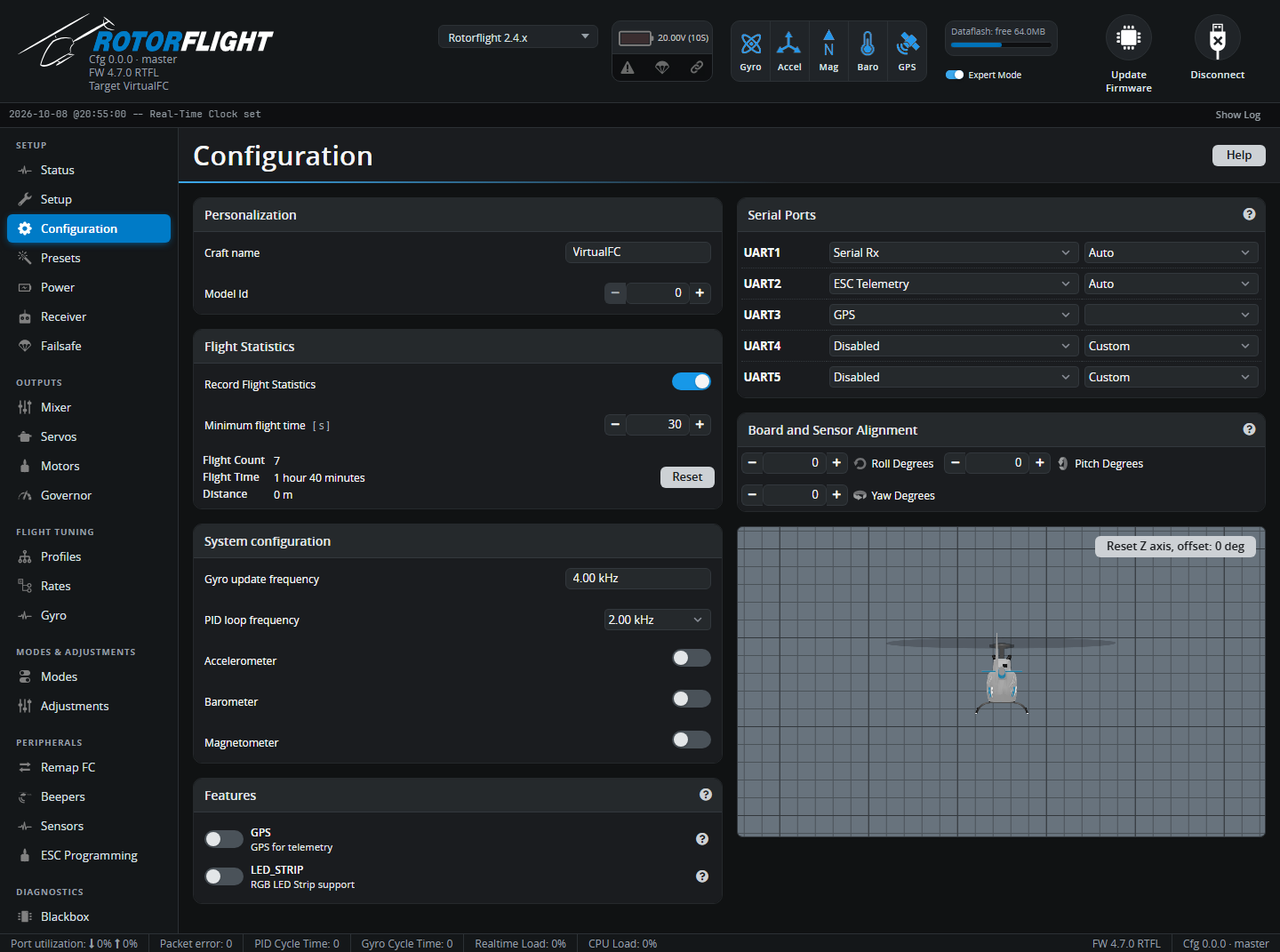
Personalization
- Craft name -- shown on the Status tab, saved in Blackbox logs and backups, and sent to the radio. Name each helicopter so you can tell backups apart.
- Model Id (0-99) -- a number sent to the radio as the Model ID telemetry sensor, so radio scripts can tell your helicopters apart.
Flight Statistics
When Record Flight Statistics is on, the flight controller counts flights, flight time and distance. A flight only counts if it stays armed for at least the Minimum flight time (default 15 s), so bench tests don't inflate the total. Reset clears the counters.
System configuration
- Gyro update frequency -- how fast the gyro is read. Fixed by the board.
- PID loop frequency -- how often the flight controller runs its control loop, as a division of the gyro rate. 1-2 kHz is plenty for a helicopter; higher rates bring no benefit and load the CPU. Keep the Realtime Load in the status bar below 70%.
- Accelerometer -- needed by every self-levelling mode: Angle, Horizon, Acro Trainer and Rescue. Turn it off only if you use none of them.
- Barometer / Magnetometer -- if the board has them. They're used for telemetry only, not for flight control.
Features
Optional features: GPS (for telemetry) and LED_STRIP. If a feature switches itself off again after Save and Reboot, the board doesn't support it.
Other features are turned on where they're configured -- for example the governor on the Governor tab and the RPM filter on the Gyro tab.
Serial Ports
Each UART can do one job. Pick its function on the left; where it matters, pick the speed on the right. Auto uses the protocol's own speed.
| Function | Use it for |
|---|---|
| Serial Rx | Your receiver. Choose the protocol on the Receiver tab. |
| ESC Telemetry | Serial telemetry from the ESC. Choose the protocol on the Motors tab; see ESC Telemetry. |
| MSP | A second Configurator or Lua connection, e.g. over Bluetooth. |
| GPS | A GPS module (enable the GPS feature too). |
| Blackbox Logging | An external logger such as OpenLager. |
| S.BUS Output | Drives SBUS servos, or other devices, from the flight controller. |
| F.BUS | FrSky F.Bus master: bus servos and sensors. See FBUS Master. |
| S.PORT Master | Reads FrSky S.Port sensors connected to the flight controller. |
| SRXL2 ESC | Spektrum SRXL2 ESCs. New in 2.4. |
| CRSF Sensors | CRSF sensors connected to the flight controller. See CRSF Sensors. New in 2.4. |
| Telemetry: FrSky SmartPort | S.Port telemetry to an FrSky receiver, when the receiver itself uses another protocol (e.g. SBUS). |
| Telemetry: FrSky Hub / iBUS / HoTT / MAVLink / LTM | Telemetry for those systems. |
CRSF, ELRS, F.Port, F.Bus, SRXL2 and iBUS2 receivers carry telemetry over the receiver link itself -- don't add a separate telemetry port for them.
On Rotorflight flight controllers the ports are labelled with the names printed on the board (Port A, S.BUS, DSM...), with the UART number in brackets.
Board and Sensor Alignment
If the flight controller isn't mounted flat with its arrow pointing forward, tell it how it's rotated: Roll, Pitch and Yaw Degrees. Common cases:
| Mounting | Setting |
|---|---|
| Arrow pointing backwards | Yaw 180 |
| Arrow pointing right | Yaw 90 |
| Arrow pointing left | Yaw 270 |
| Upside down | Roll 180 |
| On its side, on the left of the frame | Roll 90 (or 270), plus yaw as needed |
Check the result on the 3D model: tilt the helicopter nose down, roll it right and turn it right, and the model must do the same. MAG Alignment appears when the board has a compass.
Accelerometer Trim
Shown when the accelerometer is on. Fine-tunes the level that Angle, Horizon and Rescue modes hold, to stop a hover drifting:
- Roll trim -- increase if the helicopter drifts left, decrease if it drifts right.
- Pitch trim -- increase if it drifts backwards, decrease if it drifts forwards.
Always leave your radio's cyclic trims at centre. You can also set these trims in flight -- see Stability Modes.