GooSky F4 Mini
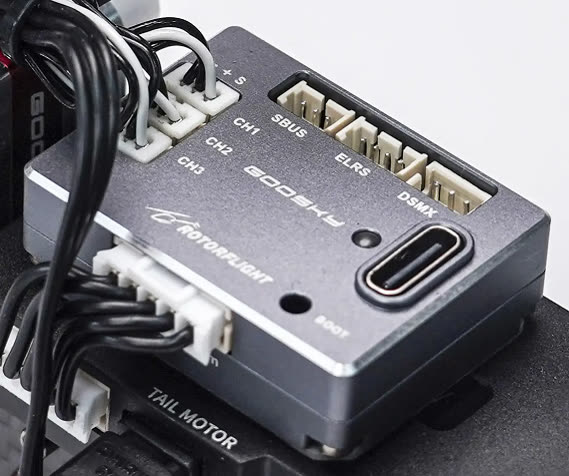
A small Rotorflight flight controller, and a drop-in replacement for the stock flight controller in the GooSky S2 Max and S2 Ultra.
| Board | GOOSKY_F4MINI |
| MCU | STM32F405 |
| Gyro | ICM-42688-P |
| Blackbox | 128 MB flash (W25N01G) |
| Servo outputs | 3 (1.25 mm micro JST, Molex PicoBlade compatible) |
| UARTs | UART1 (ELRS / DSMX), UART2 (SBUS), UART5 (ESC telemetry) |
| Connectors | 3-pin SBUS, 4-pin ELRS (1.25 mm), 3-pin DSMX (JST-ZH), 5-pin ESC (JST-PH: power, telemetry, main and tail motor) |
| Supply | 5-16 V |
| Size, weight | 24 × 33 × 9 mm, 12 g |
It pairs with the GooSky 3S F421 2-in-1 ESC: two AT32F421 ESCs running AM32, with bidirectional DShot RPM for both motors and BLHeli32-format telemetry (voltage, current, temperature).
Setting up an S2 Max or S2 Ultra
1. Flash the F4 Mini
Flash the latest release
with the GOOSKY_F4MINI board and Full chip erase.
2. Configure
Look for an S2 preset on the Presets tab, or set up the helicopter with the Setup Guides. Then:
- Calibrate the accelerometer.
- Centre the servos.
- Check the collective trim and zero pitch.
- Set up rates, modes and adjustments for your radio.
The Rotorflight 2.2 S2 tune
The team's S2 tune (headspeeds 4400 / 5100 / 5500 rpm) was made for Rotorflight 2.2: f4mini-s2-diff.txt. Use it for reference rather than loading it onto 2.3 or later, where the governor and rates have changed -- see the Upgrade Notes.
3. Update the ESC firmware
Warning
Follow this carefully. A failed flash can leave the ESC needing special tools to recover.
- Download the latest
AM32_GOOSKY_3S_F421_<version>.hexfrom the AM32 releases. - Power up the S2 and connect the F4 Mini by USB. Make sure the Rotorflight Configurator isn't connected.
- Open am32.ca/configurator, click Connect, then Read.
- Flash firmware → Local tab. The first time, tick Ignore current MCU layout. Choose the hex file and Start flash.
4. Configure the ESCs
ESC 1 drives the main motor, ESC 2 the tail. They need slightly different settings -- the main ESC mustn't brake on spool-down, while the tail ESC uses complementary PWM.
- In the AM32 Configurator, Apply config with s2-main-esc-config.bin, with only ESC 1 selected.
- Apply config with s2-tail-esc-config.bin, with only ESC 2 selected.
- Disconnect and power down.
In 2.4, the ESC Programming tab can also change AM32 settings per ESC.
Editing the tail ESC in the AM32 Configurator
The AM32 Configurator shows ESC 1's settings even when only ESC 2 is selected. To edit the tail ESC there, temporarily expose only the tail ESC from the Rotorflight CLI:
resource MOTOR 1 A08
resource MOTOR 2 NONE
save
and afterwards restore:
resource MOTOR 1 C08
resource MOTOR 2 A08
save
Check everything carefully, then go and fly.