FrSky Ethos
RFSuite for Ethos is Rotorflight's Lua suite for FrSky radios. It adds:
- a configuration tool in the System menu, with touch pages for almost everything the Configurator does -- tuning, governor, mixer, servos, power, ESC programming;
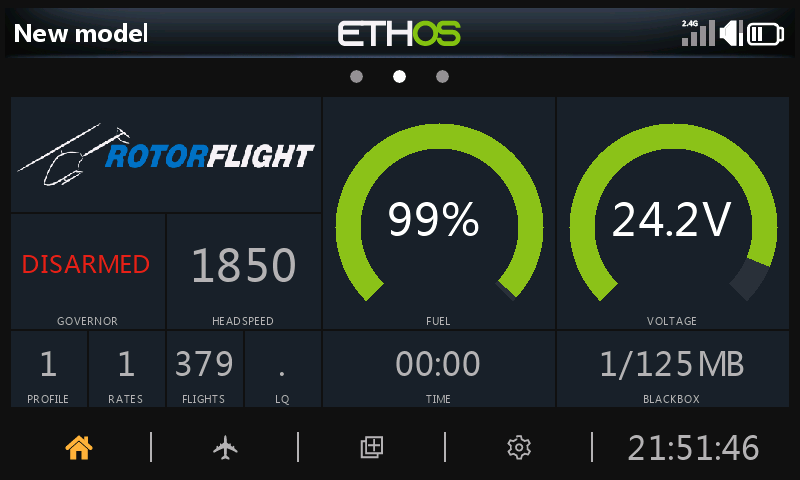
- a dashboard widget that shows the helicopter's state, headspeed, fuel and voltage, changing layout before, during and after the flight;
- voice announcements for arming, profiles, adjustments and fuel;
- flight logs, and an ActiveLook glasses widget.
Try it without a radio
The RFSuite web simulator runs the suite in your browser, against a simulated helicopter.
Requirements
- Ethos 1.6.2 or later, on an X10, X12, X14, X18, X20 or Twin X Lite.
- A receiver with telemetry:
- FrSky ACCESS, ACCST, TD or TW receivers on S.Port, F.Port or F.Bus -- for example Archer, TD MX, TW MX, R-XSR, RX6R;
- or ExpressLRS, through an Ethos-supported ELRS module.
- Rotorflight firmware from the same release as the suite.
Installing
- Download the RFSuite Updater for Windows, macOS or Linux.
- Connect the radio to the computer by USB.
- Run the updater, choose the release and language, and install.
- Download the zip for your language from the RFSuite releases.
- Connect the radio to FrSky's Ethos Suite, open Lua Development
Tools, choose Install Lua Scripts, select the zip and install
rfsuite.
Restart the radio afterwards.
First start
- Set up the radio model and telemetry -- see Radio Setup.
- Make sure the Rotorflight [Background] task is running: in the model's Lua page, enable it. The dashboard shows Background task not running if it isn't.
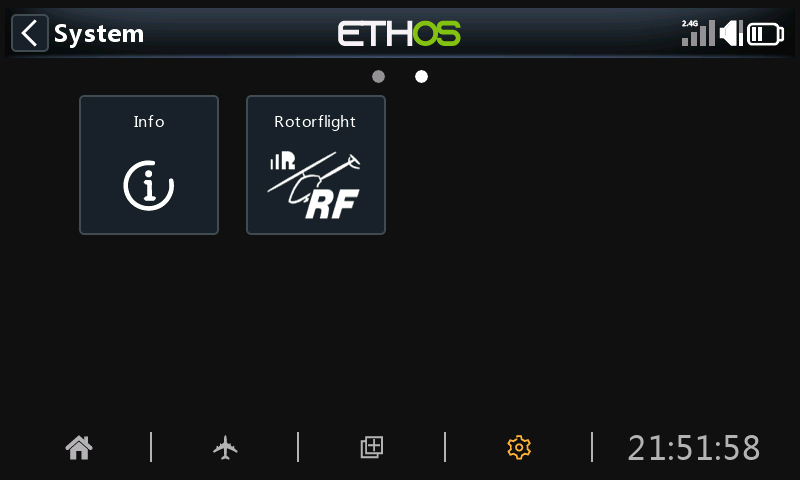
- Power up the helicopter, then press SYS, go to the second page and open Rotorflight.
Then see Using RFSuite.
Reference
Every RFSuite page is documented, setting by setting, in the RFSuite page reference.