Adjustments
Adjustments change settings in flight from a switch, knob or trim on your radio: switch profiles, nudge a gain, set a headspeed. They're the way to tune from the radio if you don't use the Lua suites.
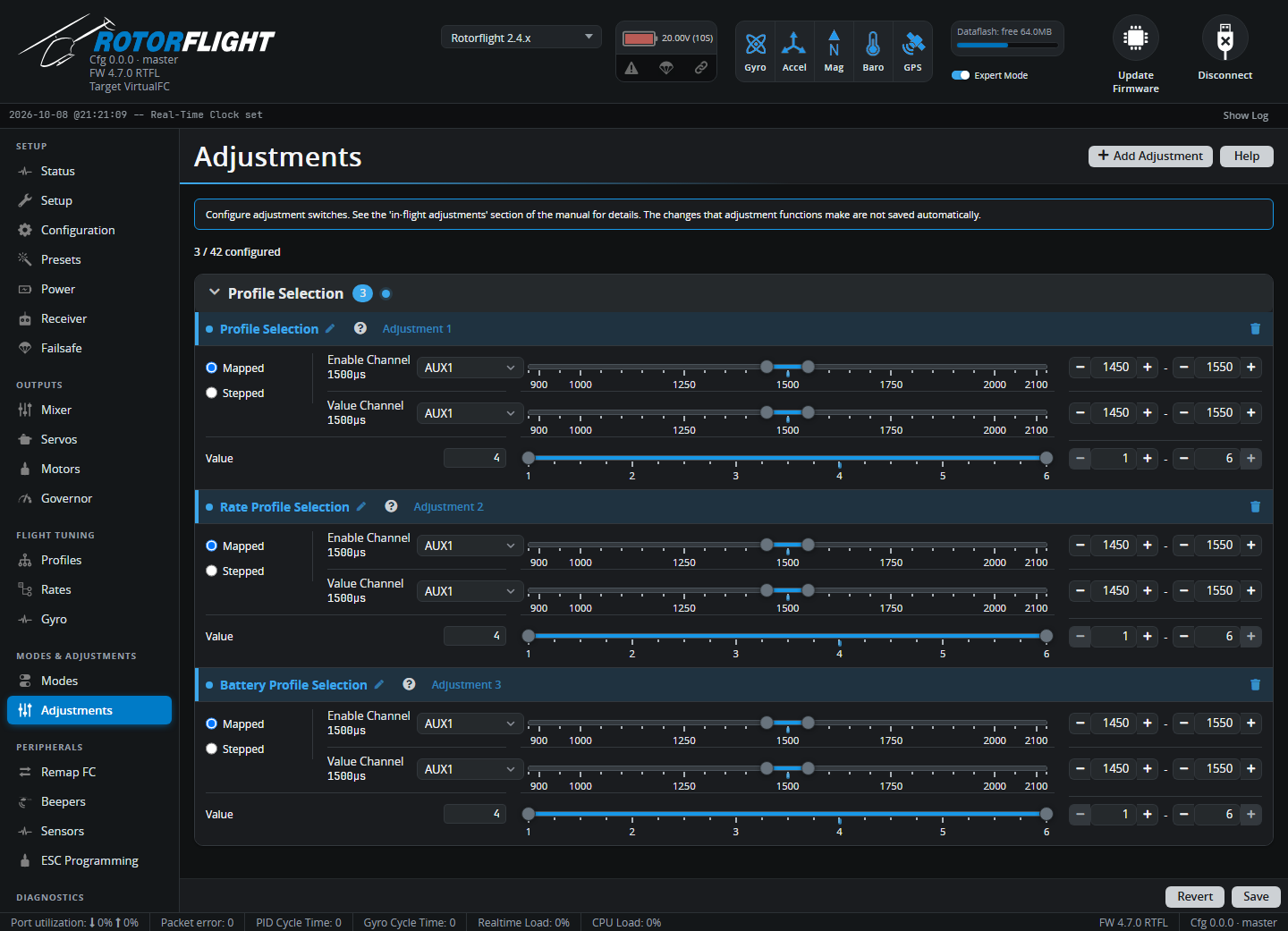
Up to 42 adjustments can be set up. Changes are applied immediately, and saved when you disarm. Each change gives a confirmation beep and is recorded in the Blackbox log.
Adding an adjustment
- Click Add Adjustment and pick a function. Search, or browse the groups: Profile Selection, Rates, PID Gains, Filters, Yaw Dynamics, Stability, Accelerometer Trim, Setpoint Boost, Cross Coupling, Yaw Precomp, Rescue, Governor.
- Set the Enable Channel and its range: the adjustment only works while this channel is in range. Use ALWAYS to leave it on all the time.
- Choose the type and set the Value Channel (below).
- Set the Value limits: the adjustment never goes outside them.
- Save.
Mapped and Stepped
The value channel's position sets the value directly: the range you set on the value channel is stretched over the value range. Use it with a knob or slider for gains, or with a multi-position switch for profiles.
For example Profile Selection, value 1-3, on a 3-position switch: switch up = profile 1, middle = 2, down = 3.
A small deadband stops the value flickering when a knob sits between two values.
The value channel works like a trim: moving it into the decrease range lowers the value by Step, moving it into the increase range raises it. Hold it there to repeat. Use it with a spring-loaded switch or a trim, for fine tuning a gain while flying.
Functions
| Group | Functions |
|---|---|
| Profile Selection | PID profile, rate profile, battery profile, LED profile |
| Rates | Rate, expo and shape per axis |
| PID Gains | P, I, D, F per axis; B (boost) and O (HSI offset) gains |
| Filters | Gyro bandwidth and D-term cutoff per axis |
| Yaw Dynamics | Dynamic ceiling and deadband |
| Stability | Angle and Horizon levelling gains, Acro Trainer gain |
| Accelerometer Trim | Roll and pitch trim -- trim out a drifting hover in Angle mode |
| Setpoint Boost | Boost gain per axis |
| Cross Coupling | Gain, ratio and cutoff |
| Yaw Precomp | CW/CCW stop gains, cyclic and collective feedforward, inertia precomp, collective-to-pitch |
| Rescue | Climb and hover collective, hover altitude, altitude PID |
| Governor | Headspeed, gains, precomp, TTA, idle/auto/min/max throttle |
The ? next to each function's name describes it.
See Profile Switching for a worked example.