Blackbox
The Blackbox records detailed flight data -- sticks, gyro, PID terms, servo and motor outputs, RPM, governor, battery -- many times a second. Open the logs in the Blackbox Explorer to see exactly what the helicopter did. It's the main tool for tuning and for working out what went wrong.
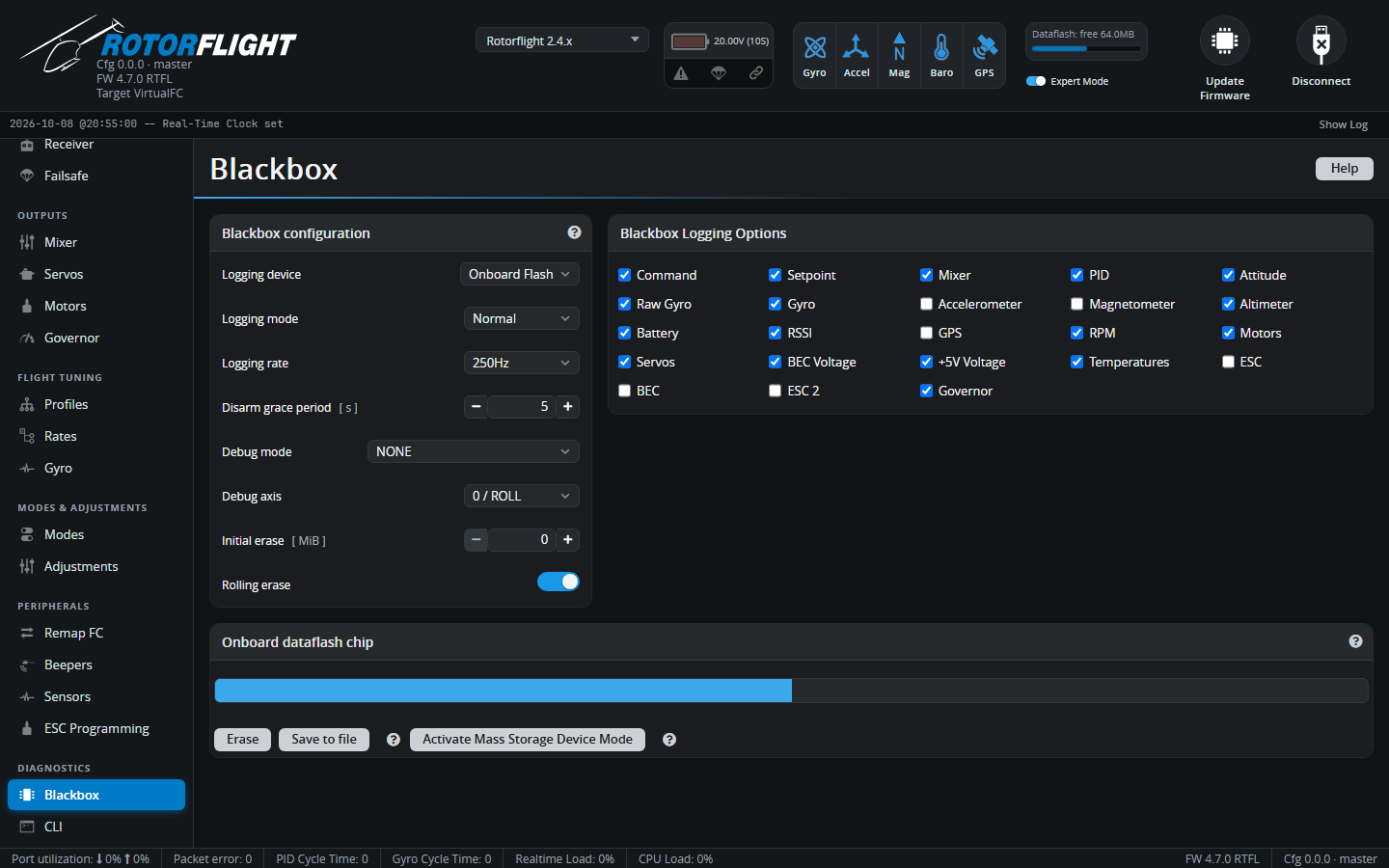
Blackbox configuration
| Setting | |
|---|---|
| Logging device | Onboard Flash, SD Card (if the board has one), Serial Port (an external logger such as OpenLager, on a UART set to Blackbox Logging), or No Logging. |
| Logging mode | Armed (default) -- log whenever armed. Switch -- log while the BLACKBOX mode switch is on. Normal -- log while armed and the switch is on. Off. |
| Logging rate | How often data is recorded. Higher rates show more detail but fill the flash faster. For filter and vibration work, log at the highest rate the device can manage; for general flying, lower is fine. External loggers may need a lower rate. |
| Disarm grace period [s] | Keeps logging for a few seconds after disarming, to capture what happened after a crash. 0 turns it off. |
| Debug mode / Debug axis | Adds eight extra values for troubleshooting a particular feature, e.g. GOVERNOR, RPM_FILTER, RPM_SOURCE, TTA, AIRBORNE. Leave on NONE unless you're investigating something. |
| Initial erase [MiB] | Erases old logs at arming so at least this much space is free. Logging starts once the erase finishes, which can take a while on some chips. 0 turns it off. |
| Rolling erase | When the flash is full, overwrite the oldest logs. On by default. |
Blackbox Logging Options
Choose which data to record: Command, Setpoint, Mixer, PID, Attitude, Raw Gyro, Gyro, Accelerometer, Magnetometer, Altimeter, Battery, RSSI, GPS, RPM, Motors, Servos, BEC voltage, 5V voltage, Temperatures, ESC, BEC, ESC 2 and Governor. Fewer fields mean more flight time fits on the flash.
Onboard dataflash chip / SD card
Shows how full the storage is.
- Activate Mass Storage Device Mode -- the best way to get the logs: the flight controller reboots as a USB drive and you copy the files off. Eject and power cycle to return to normal.
- Save to file -- downloads the flash over the Configurator connection. Slow and can corrupt large logs; use mass storage mode instead.
- Erase -- deletes all logs.
See Blackbox in the Reference section for more about logging.