GooSky F4 Mini
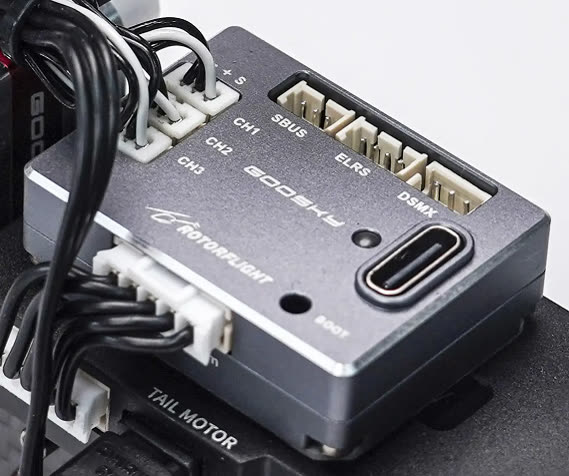
A small Rotorflight flight controller, and a drop-in replacement for the stock flight controller in the GooSky S2 Max and S2 Ultra.
| Board | GOOSKY_F4MINI |
| MCU | STM32F405 |
| Gyro | ICM-42688-P |
| Blackbox | 128 MB flash (W25N01G) |
| Servo outputs | 3 (1.25 mm micro JST, Molex PicoBlade compatible) |
| UARTs | UART1 (ELRS / DSMX), UART2 (SBUS), UART5 (ESC telemetry) |
| Connectors | 3-pin SBUS, 4-pin ELRS (1.25 mm), 3-pin DSMX (JST-ZH), 5-pin ESC (JST-PH: power, telemetry, main and tail motor) |
| Supply | 5-16 V |
| Size, weight | 24 × 33 × 9 mm, 12 g |
It pairs with the GooSky 3S F421 2-in-1 ESC: two AT32F421 ESCs running AM32, with bidirectional DShot RPM for both motors and BLHeli32-format telemetry (voltage, current, temperature).
Setting up an S2 Max or S2 Ultra
1. Flash the F4 Mini
Flash the latest release
with the GOOSKY_F4MINI board and Full chip erase.
2. Configure
Look for an S2 preset on the Presets tab, or set up the helicopter with the Setup Guides. Then:
- Calibrate the accelerometer.
- Centre the servos.
- Check the collective trim and zero pitch.
- Set up rates, modes and adjustments for your radio.
The Rotorflight 2.2 S2 tune
The team's S2 tune (headspeeds 4400 / 5100 / 5500 rpm) was made for Rotorflight 2.2: f4mini-s2-diff.txt. Use it for reference rather than loading it onto 2.3 or later, where the governor and rates have changed -- see the Upgrade Notes.
3. Update the ESC firmware
Warning
Follow this carefully. A failed flash can leave the ESC needing special tools to recover.
- Download the latest
AM32_GOOSKY_3S_F421_<version>.hexfrom the AM32 releases. - Power up the S2 and connect the F4 Mini by USB. Make sure the Rotorflight Configurator isn't connected.
- Open am32.ca/configurator, click Connect, then Read.
- Flash firmware → Local tab. The first time, tick Ignore current MCU layout. Choose the hex file and Start flash.
4. Configure the ESCs
ESC 1 drives the main motor, ESC 2 the tail. They need slightly different settings -- the main ESC mustn't brake on spool-down, while the tail ESC uses complementary PWM.
- In the AM32 Configurator, Apply config with s2-main-esc-config.bin, with only ESC 1 selected.
- Apply config with s2-tail-esc-config.bin, with only ESC 2 selected.
- Disconnect and power down.
Editing the tail ESC in the AM32 Configurator
The AM32 Configurator shows ESC 1's settings even when only ESC 2 is selected. To edit the tail ESC there, temporarily expose only the tail ESC from the Rotorflight CLI:
resource MOTOR 1 A08
resource MOTOR 2 NONE
save
and afterwards restore:
resource MOTOR 1 C08
resource MOTOR 2 A08
save
Check everything carefully, then go and fly.