Power
Battery measurement, SmartFuel and voltage/current sensor calibration.
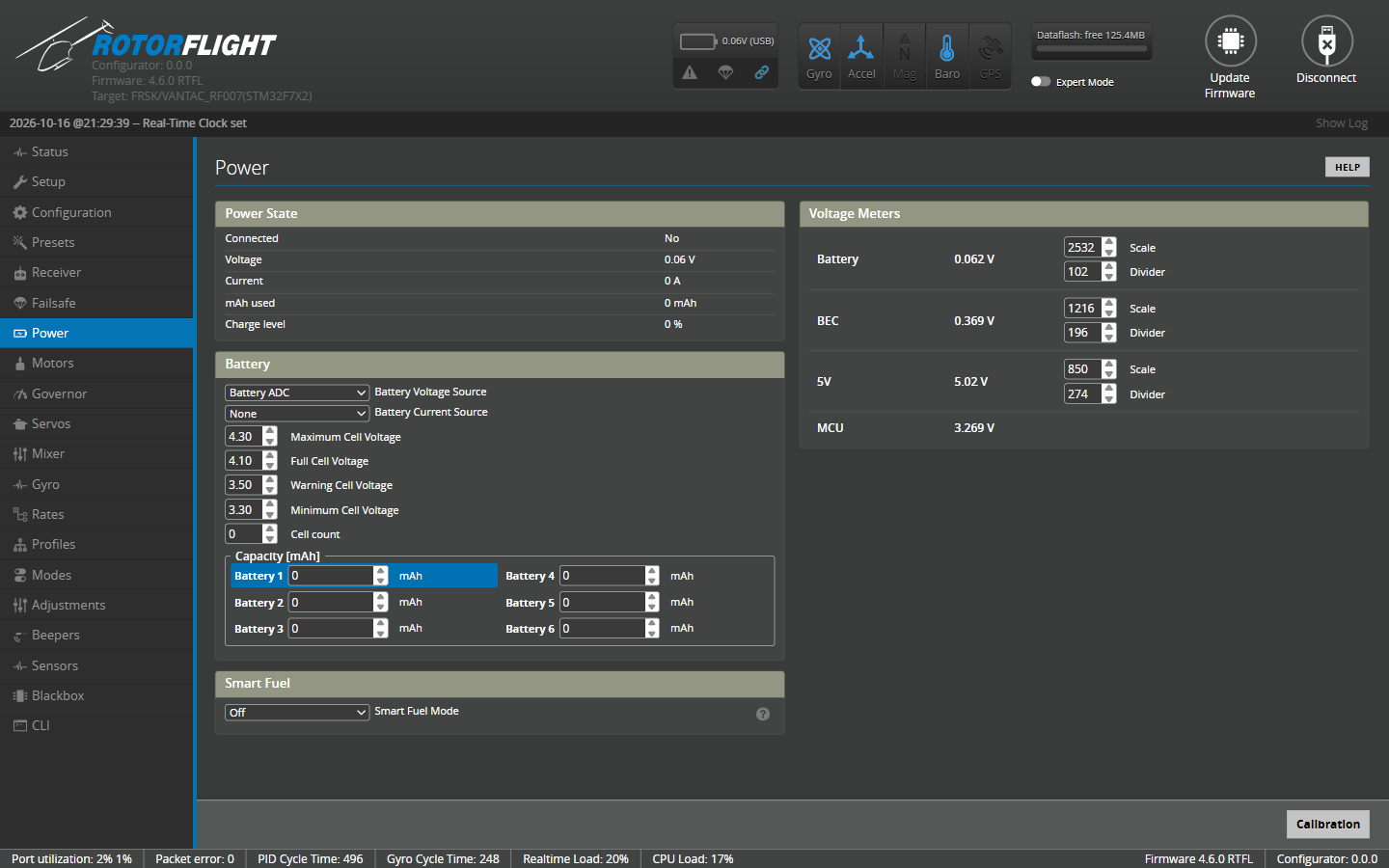
Power State
Live readings: whether a battery is connected, voltage, current, mAh used and charge level. With USB power only, Connected reads No.
Battery
| Setting | Meaning | Typical LiPo |
|---|---|---|
| Battery Voltage Source | Where the pack voltage comes from -- see Meters. | |
| Battery Current Source | Where the current comes from -- see Meters. | |
| Maximum Cell Voltage | Highest believable cell voltage; used for cell count detection. | 4.30 |
| Full Cell Voltage | A fully charged cell. The fuel gauge reads 100% here. | 4.10-4.20 |
| Warning Cell Voltage | Low-voltage warning. | 3.50 |
| Minimum Cell Voltage | Empty cell. The fuel gauge reads 0% here. | 3.30 |
| Cell count | Number of cells. 0 detects the count from the voltage when the battery is plugged in -- reliable for full packs, but a half-empty pack can be miscounted, so set it if you can. | 0 or your pack |
| Capacity [mAh] | Pack capacity. Used for mAh-based fuel and SmartFuel Current mode. | Your pack |
For LiHV packs raise Maximum and Full (e.g. 4.40 and 4.35).
The cell count and cell voltages apply to every pack. The capacity is kept for each of six battery profiles, so one helicopter can fly packs of different sizes: switch from the radio with the Battery Profile adjustment or the Lua suite.
Smart Fuel
SmartFuel gives a fuel percentage that behaves sensibly in flight: it never jumps back up when the load drops, and it allows for voltage sag under load.
| Setting | |
|---|---|
| Smart Fuel Mode | Off; Voltage -- estimate from the pack voltage; Current -- mAh used against the capacity; Combined -- whichever of the two is lower. A battery voltage source is needed for any mode. |
| Smart Fuel Voltage Drop Rate | (Voltage and Combined) How fast the voltage estimate may fall. |
| Smart Fuel Charge Drop Rate | (Voltage and Combined) How fast the displayed percentage may fall once armed. |
| Smart Fuel Sag Gain | (Voltage and Combined) Expected sag per cell at full load. Raise it if SmartFuel reads too low under load, lower it if it reads too high. |
The landing reserve -- the level the radio scripts show as 0% fuel, default
35% -- is set in the CLI with cbat_alert_percent.
See SmartFuel for how it works and how to set it up.
Meters
Where the battery voltage and current come from:
| Source | |
|---|---|
| None | Not measured. |
| Battery ADC | The flight controller's own voltage and current inputs. |
| ESC | The ESC's telemetry. See ESC Telemetry. |
| FBUS | FrSky voltage/current sensors on the F.Bus or S.Port master link. |
Voltage Meters and Current Meters
Each ADC input -- Battery, BEC, 5V, EXT -- has a Scale and Divider, and the current meter a Scale and Offset. Rotorflight flight controllers come with these set correctly. For other boards, use the Calibration button:
- Remove the blades and plug in a battery.
- Measure the real battery voltage with a multimeter (and the current, if you have a way to).
- Click Calibration, enter the measured values and click Calibrate.
- Check the new scales, click Apply Calibration, then Save.
- Confirm the readings now match your meter.